You are hereCalculate
Calculate
Calculate
In Figure 1is represented the first screen for the calculus of the quantities that Spazio Software assumes the purpose to produce.
In particular it is possible calculate:
1. Mission
2. Attitude
3. GR
4. Fluxes
5. GL (not supported)
6. Temperature
It is possible to note in Figure 1 that for each type of Simulation are present:
1. Input
2. Output
3. Start
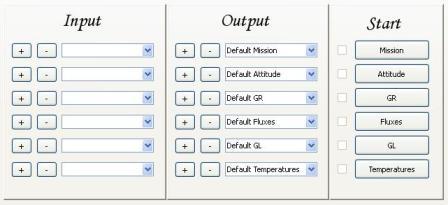
Figure 1
INPUT
It is sufficient to press the + Button to load Inputs, the – Button to delete them.
Inputs are loaded from the Combo Box of respective analysis if the relative Check Boxes are checked, otherwise an error message is shown.
In the case in which Button of Input Section are pressed, a Dependence can be noticed.
Table 1 shows for each type of Analysis the corresponding Input.
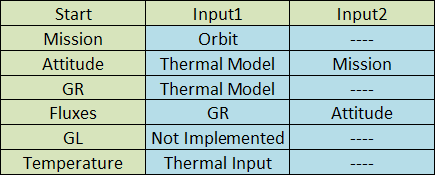
Table 1
OUTPUT
Pressing the + Button a new Output is created.
You must fill in the Combo Box of Output to define the name of the new Output.
Once created a new Output, it is by default without Input and the corresponding Check Box in Start Section is not checked.
Pressing the – Button the Output is deleted, in this case a Dependence can be noticed.
Choosing an Output with the Combo Box, relatives Inputs are loaded in the Combo Box of Input Section, and the Check Box of Start Section is checked if the Output was processed.
START
Once Inputs are inserted it is possible to start Simulation with the Button of start Section.
If Inputs are not present n error message is shown.
Once started the Analysis the Output is processed and the relative Check Box is checked.
If the Check Box is checked the pressure of the Button of Start Section has no effect.
If the Analysis is GR, Fluxes or Temperature, a Progress Bar indicates the percentage of completeness of the Analysis.