You are hereGuide
Guide
Guide
The scope of this Section is to show the functionality of the Guide.
The Guide is divided in these parts:
1. Tools to access to the contents of the Guide
2. Tree Structure of the Guide
3. Graphic Area
4. Chronology
5. Search Section
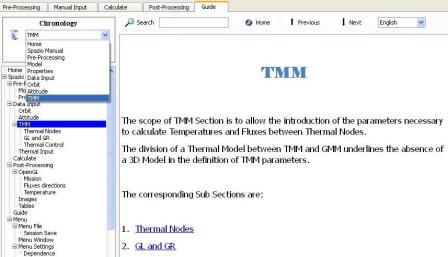
Figure 1
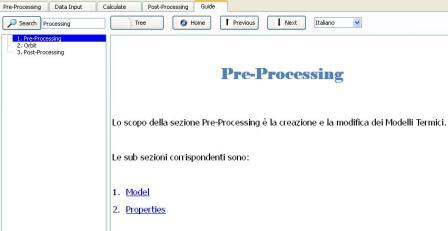
Figure 2
Tools to access to the contents of the Guide
The tools to access to the contents of the Guide are:
1. Button and Line Edit “Search”
2. Button “Tree”
3. Button “Previous” and “Next”
4. Button “Home”
5. Combo Box Language
To effectuate a Search it is sufficient to fill the Line Edit “Search” and press the relative Button.
In this way you switch from the visualization of the Guide of Figure 1 to Figure 2.
In this way Section Search is visualized at the expense of the visualization of the Tree Structure of the Guide and of the Chronology.
To return to the visualization of the Guide of Figure 1, it is necessary to press the Button “Tree”.
With Buttons “Previous” and “Next” you scroll up and down the contents of the Search Section or of the Tree Structure of the Guide.
With Home Button you return to the First Page of the Guide.
With Language Combo Box you can translate to the chosen Language the current Page, the contents of the Search Section or of the Tree Structure of the Guide and the Chronology.
Tree Structure of the Guide
Tree Structure of the Guide displays all available contents.
Selecting a branch, relative .HTM file is opened, with Language set in the Combo Box Language.
Graphic Area
In the Graphic Area is shown the .HTM File selected in the Tree Structure of the Guide or in the Search Section, in the Language set in the Language Combo Box.
It is possible to select an .HTM File also through the Tools to access to the contents of the Guide.
Through hyperlinks you can surf Guide contents. This navigation is tracked in the Chronology only if the Search Section is not visualized.
Chronology
In the Section Chronology there are 3 Buttons and a Combo Box.
Buttons allow to display .HTM Files saved in the Chronology before or after the storage in the Chronology of the actual File.
If the last saved content of the Chronology is different from the selected content, the selected content is saved in the Chronology as last element.
Selected contents saved in the Chronology are those selected through the Tree Structure of the Guide, through the Tools to access to the contents of the Guide, or hyperlinks.
Chronology is translated each time the language selected in the Language Combo Box changes.
With the Basket Button you can delete all the element of the Chronology with the exception of the current.
If the Search Button is pressed, the Chronology is no longer displayed and the storage of contents in the Chronology is deactivated.
Search Section
Pressing the Search Button, the Search Section is visualized at the expense of the visualization of the Tree Structure of the Guide and of the Chronology.
As shown in Figure 2 the Search Section displays all contents, in the order shown in the Tree Structure of the Guide, that contain the text typed in the Search Line Edit.
You can surf in the Guide Section through the Tools to access to the contents of the Guide, clicking on a content of the Search Section or on a hyperlink in the Graphic Area.
This navigation leave no trace in the Chronology.