You are hereGL and GR
GL and GR
GL and GR
In this Section are treated the modalities of insertion of GL (first target) and GR (second target) in the TMM.
As it is shown in Figure 1, the implementation of the two targets is specular, therefore it is described only one of the two halves of which this screen of Spazio Software is composed.
They are present 5 Buttons, a Combo Box and a Table.
With the + Button it is possible to create a set of GL in the TMM.
Once the + Button is pressed, you must insert in the relative Combo Box the name of the new set.
With the – Button, it is possible to delete a set of GL of the TMM, a Dependence can be noticed.
There are also two Buttons to import and export CSV data of the Table.
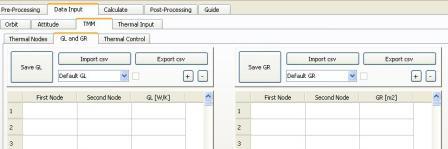
Figure 1
Introduzione dei parametri di un set di GL TMM e di GR TMM
The Units of Measurements of GL and GR are respectively W/K and m2.
They are multiplied in the Temperature Equation respectively per a difference of Temperatures (ΔT[K]) and a difference of Temperatures raised to the power of four multiplied for a constant (σΔ(T4)[W/ m2]).
For each row the three fields must be all empty or all convertible to numbers.
First two fields represent ID numbers of the two nodes connected to each other by a GL or a GR.
If first two fields identify the same Thermal Node an error is shown.
If two rows present the same couple of nodes an error is shown.
If First two fields haven’t a value strictly greater than zero, an error is shown.
If the third field has a value minor than zero an error is shown.
If in the two first fields a Thermal Node is inserted which is not defined nor in a TMM Nodes set, nor in the Thermal Model, an error will be shown in the generation of Thermal Input.
If the GR or the GL(not supported) for a given couple of Thermal Nodes are already defined in the GMM, the GR or GL value introduced in TMM will be summed to those that has been calculated in the GMM with analysis.
Once inserted the parameters in the Table it is possible to save with the Save Button the GL set in the TMM.
Then the Check Box is checked. If it is already checked a Dependence can be noticed.
With the Combo Box it is possible to visualize the data relative to other GL sets of the TMM created previously.
If it is visualized a Set not previously saved, the Table is empty and the Check Box is not checked.